Link Tables
A link table lists the rows of other tables that a row of its source table relates to, with one row for each related row. Use it when a row relates to a variable number of rows in other tables.
A meeting has one host and up to three guests, and each person is a row of an employee table. The host
is on every meeting, so meeting has one host_id column, which is a Reference
to employee. The number of guests varies. With Reference fields, each guest is a separate field. Up to
three guests needs three fields, three columns in meeting and three foreign keys from meeting to
employee. A meeting with fewer guests has empty columns, so the structure of the table fixes the number
of guests.
A link table moves the guests out of meeting. A meeting_guest link table has one row for each guest on
each meeting. Each row has the ID of the meeting, the ID of the host, the ID of the guest and other
columns of the meeting row, such as the guest's role. The host and the meeting are on every row. A meeting
with one guest has one row, and a meeting with three guests has three. The relationship is a single many-to-many relationship made only of the guests that are filled in,
and the schema declares one foreign key for each table it relates, however many guests a meeting has.
The columns of meeting can also be used by other fields. For example, a
Calculated field can build a narrative from the host and the guests that are
filled in, and the link table lists the same guests.
A bridge table also produces a many-to-many relationship, but it selects both sides separately, so its pairs do not come from the row of any other table. A link table copies from rows that are already generated, so the relationship it lists is the one in the source row.
A link table is an entry in a request's tables list with "type": "Link". Every other table has
"type": "Standard", which is the default when type is left out. A link table requires a source table in the same request, so POST /v1/generate-table
does not accept one. See Building a Request for the structure of a request.
Properties
| Property | Type | Default | Description |
|---|---|---|---|
columns |
object? |
none | Overrides the default dataType and visibility of columns of the link table. By default, a column has the dataType of the source column it is copied from and is not hidden. Each entry is the name of a column of the link table, followed by its dataType, hidden, or both. See Column types and hidden columns. |
fields |
FieldRequest[] |
none | Fields generated for each row of the link table, in addition to the copied columns. See Fields of a link table. |
fieldStartIndex |
integer |
1 |
The position, among the entries of fields, where the copied columns are written. 1 writes them before every field, and 2 writes them after the first field. See Position of the copied columns. |
map |
object |
none | The columns of the source table to copy into every row of the link table. Each entry is written "source column": "link table column". See Writing columns. |
name |
string |
required | The name of the table, and of its CSV file in a .csvx package. |
primaryKey |
string[]? |
none | The columns of the link table that form its primary key, in order. They can be copied columns or columns of fields. See Primary key. |
rowCount |
not accepted | The source sets the number of rows. A request that sets rowCount is rejected. |
|
sets |
object[] |
required | The groups of source columns that each produce a row. Each set is an object of "source column": "link table column" entries. At least one set is required. See How rows are produced. |
source |
string |
required | The table to copy the rows from. It must be an ordinary table, listed before the link table. |
type |
"Link" |
required | Declares a link table. |
How rows are produced
Each entry in sets is a group of source columns that produces one row of the link table from a source
row. A source row can produce a row for each set. In the meeting example, there is a set for each guest:
"sets": [
  { "guest1_id": "employee_id", "guest1_role": "role" },
  { "guest2_id": "employee_id", "guest2_role": "role" },
  { "guest3_id": "employee_id", "guest3_role": "role" }
]
The rows of the source are processed in order, and for each source row every set is processed in order.
A set produces a row when every column of the set that references another table has a value. A column
references another table when the source generates it with a Reference field
mapped to value.
Here, guest1_id, guest2_id and guest3_id are references. Each set produces a row when its guest
column has a value. The other column of a set, such as guest1_role, does not affect whether the set
produces a row. Its value is copied from the same source row as the reference, so the role in a row is the
role of the guest in that row. A meeting with no guests produces no rows.
The rows are in the order of the source rows, and then of the sets.
A set that copies no column that references another table is rejected, because nothing identifies the source rows it applies to. A request is also rejected when no source row produces a row, because the table would be empty.
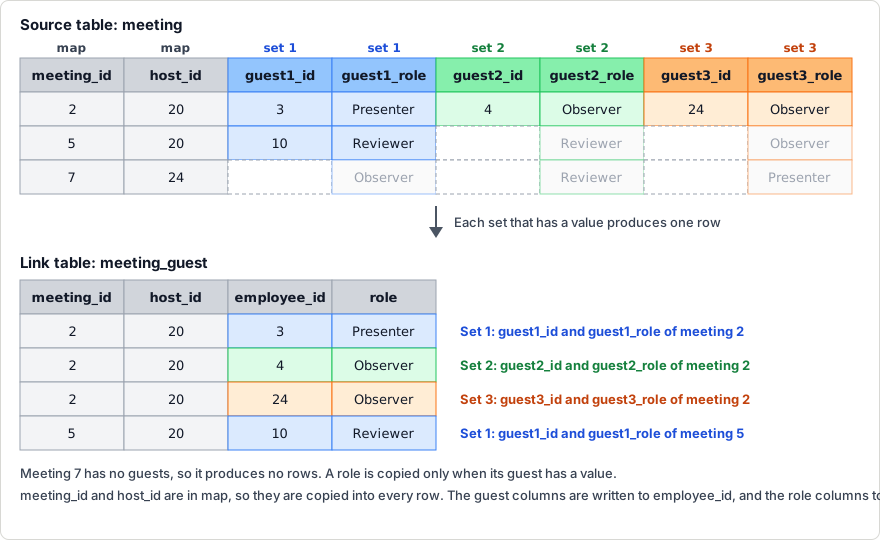
The diagram shows three rows of meeting and the rows of meeting_guest that are produced from them. Each
color is one set. The columns of a set are written to the same columns of the link table, in a row for each
set that has a value. meeting_id and host_id are in map, so they are copied into every row.
Number of rows
The number of rows is the total number of rows the sets produce. The number is known when the source has
been generated, and the response reports it as the table's rowCount.
Before the source is generated, the checks that apply to the whole request use the most rows the table can have, which is the number of rows in the source multiplied by the number of sets. This applies to the estimate endpoints and to the limits on a request.
Writing columns
map and each set are objects of entries. Each entry is written "source column": "link table column".
The source column is the name of a column of the source table, and it can be a hidden column. The link
table column is the name the column has in the link table. For example, "guest1_id": "employee_id" copies
the guest1_id column of meeting into a column named employee_id.
map is copied into every row of the link table. Each set is copied only into the rows it produces:
"map": { "meeting_id": "meeting_id", "host_id": "host_id" },
"sets": [
  { "guest1_id": "employee_id", "guest1_role": "role" },
  { "guest2_id": "employee_id", "guest2_role": "role" }
]
This table has the columns meeting_id, host_id, employee_id and role. Both sets write to
employee_id and role, so the name and type of each column are given once.
Every set must write the same columns. A set that writes a column the first set does not, or omits one
that the first set writes, is rejected. The columns are in the order of map, then of the first set.
Column types and hidden columns
A column of the link table has the dataType of the source column it is copied from, and is not hidden.
columns changes either, for one column. Each entry in columns is the name of a column of the link
table, followed by its settings:
"columns": {
  "role": { "dataType": "Clob" },
  "meeting_id": { "hidden": true }
}
This sets the dataType of role to Clob and hides meeting_id.
| Setting | Type | Default | Description |
|---|---|---|---|
dataType |
string? |
the dataType of the source column |
The dataType of the column. It follows the same rules as a Reference field: the same type as the source column, a text type such as VarChar, or for a whole number another whole-number type. |
hidden |
boolean |
false |
Whether the column is generated but left out of the output. See Hidden columns. |
Every set writes to the same column, so a request is rejected when a set's source column cannot be written
as the column's type. For example, a column written from an Integer source column in one set and from a
Date source column in another set. An entry in columns for a column that no set writes is also
rejected.
Keys
Foreign keys
The generated schema declares a foreign key on each column of the link table that is copied from a
Reference field. A column that the sets write from different fields has a key only
when the field of every set has the same target. In the example, host_id and employee_id are each a
foreign key to employee_id in employee.
The schema also declares a foreign key from the link table to the source table. This requires the source to
declare a primaryKey, because a foreign key refers to a primary key. map must also copy every column of
that primaryKey, and none of those columns can be hidden. In the example, meeting_id is a foreign key
to meeting_id in meeting, because meeting declares "primaryKey": ["meeting_id"]. If the source
declares no primaryKey, the schema has no foreign key to the source.
A column that is hidden in the link table has no foreign key. If different sets copy references to different columns into the same column of the link table, the request is rejected.
Primary key
primaryKey lists the columns of the link table that form its primary key, in order. The columns can be
copied columns, or columns generated by fields. A key column is never null, so the generated schema
declares it not null. The field that writes a generated key column cannot set nullPercentageMin or
nullPercentageMax above 0, and a key column that comes out empty in any row is rejected. The
generated values are also checked, and a repeated key is rejected. A listed column must not be hidden.
With no primaryKey, the table has no primary key.
To give the table a key that is separate from the copied columns, add a sequential
Number field to fields and list its column in primaryKey. See
A generated primary key.
Fields of a link table
fields accepts any field. Each field is generated once for each row of the link
table, in addition to the copied columns. A Reference field can reference an
earlier table, and a later table can reference a column of a link table with a Reference field.
Position of the copied columns
The copied columns are written as one block, in the order of map and then of the first set. The fields in
fields are written in their own order. fieldStartIndex is the position, among the entries of fields,
where the block is written:
fieldStartIndex |
Order of the columns |
|---|---|
1, the default |
The copied columns, then every field. |
2 |
The first field, then the copied columns, then the other fields. |
3 |
The first two fields, then the copied columns, then the other fields. |
Use it to place a column of fields, such as a primary key, relative to the copied columns. An entry of
fields is one position, even if it writes several columns. The value must be from 1 to one more than the
number of entries in fields, which writes the copied columns after every field. A link table with no
fields rejects fieldStartIndex.
A Calculated field in fields can only read the columns before its own columns.
It can read the copied columns when they are written before it, which they are by default.
Example
The example has two ordinary tables and a link table:
employeehas only an ID.meetinghas one row for each meeting.host_idis the host, and is set on every meeting.guest1_id,guest2_idandguest3_idare guests, and have no value on about 20%, 50% and 70% of meetings, set bynullPercentageMinandnullPercentageMax.distincton each guest makes the person different from the host and from the guests before it.guest1_role,guest2_roleandguest3_roleare the role of each guest. They are hidden columns, so thatmeetingdoes not output them.meeting_guesthas one row for each guest on each meeting, with the ID of the meeting, the ID of the host and the role of the guest.
{
  "seed": 5,
  "tables": [
    {
      "name": "employee",
      "rowCount": 30,
      "primaryKey": ["employee_id"],
      "fields": [
        {
          "type": "Number",
          "mode": "Sequential",
          "start": 1,
          "map": { "value": { "column": "employee_id", "dataType": "Integer" } }
        }
      ]
    },
    {
      "name": "meeting",
      "rowCount": 20,
      "primaryKey": ["meeting_id"],
      "fields": [
        {
          "type": "Number",
          "mode": "Sequential",
          "start": 1,
          "map": { "value": { "column": "meeting_id", "dataType": "Integer" } }
        },
        {
          "type": "Reference",
          "targetTable": "employee",
          "targetColumn": "employee_id",
          "map": { "value": { "column": "host_id", "dataType": "Integer" } }
        },
        {
          "type": "Reference",
          "targetTable": "employee",
          "targetColumn": "employee_id",
          "distinct": true,
          "nullPercentageMin": 20,
          "nullPercentageMax": 20,
          "map": { "value": { "column": "guest1_id", "dataType": "Integer" } }
        },
        {
          "type": "String",
          "mode": "Lookup",
          "lookupValues": [
            { "value": "Presenter" },
            { "value": "Reviewer" },
            { "value": "Observer" }
          ],
          "map": { "value": { "column": "guest1_role", "dataType": "VarChar", "hidden": true } }
        },
        {
          "type": "Reference",
          "targetTable": "employee",
          "targetColumn": "employee_id",
          "distinct": true,
          "nullPercentageMin": 50,
          "nullPercentageMax": 50,
          "map": { "value": { "column": "guest2_id", "dataType": "Integer" } }
        },
        {
          "type": "String",
          "mode": "Lookup",
          "lookupValues": [
            { "value": "Presenter" },
            { "value": "Reviewer" },
            { "value": "Observer" }
          ],
          "map": { "value": { "column": "guest2_role", "dataType": "VarChar", "hidden": true } }
        },
        {
          "type": "Reference",
          "targetTable": "employee",
          "targetColumn": "employee_id",
          "distinct": true,
          "nullPercentageMin": 70,
          "nullPercentageMax": 70,
          "map": { "value": { "column": "guest3_id", "dataType": "Integer" } }
        },
        {
          "type": "String",
          "mode": "Lookup",
          "lookupValues": [
            { "value": "Presenter" },
            { "value": "Reviewer" },
            { "value": "Observer" }
          ],
          "map": { "value": { "column": "guest3_role", "dataType": "VarChar", "hidden": true } }
        }
      ]
    },
    {
      "type": "Link",
      "name": "meeting_guest",
      "source": "meeting",
      "map": { "meeting_id": "meeting_id", "host_id": "host_id" },
      "sets": [
        { "guest1_id": "employee_id", "guest1_role": "role" },
        { "guest2_id": "employee_id", "guest2_role": "role" },
        { "guest3_id": "employee_id", "guest3_role": "role" }
      ]
    }
  ]
}
The first rows of meeting. The hidden columns are not in the output:
| meeting_id | host_id | guest1_id | guest2_id | guest3_id |
|---|---|---|---|---|
| 1 | 23 | 18 | ||
| 2 | 20 | 3 | 4 | 24 |
| 3 | 25 | 19 | 9 | |
| 4 | 30 | 19 | 10 | |
| 5 | 20 | 10 | ||
| 6 | 26 | 1 | 27 | 3 |
| 7 | 24 |
The rows of meeting_guest for those meetings:
| meeting_id | host_id | employee_id | role |
|---|---|---|---|
| 1 | 23 | 18 | Presenter |
| 2 | 20 | 3 | Presenter |
| 2 | 20 | 4 | Observer |
| 2 | 20 | 24 | Observer |
| 3 | 25 | 19 | Reviewer |
| 3 | 25 | 9 | Presenter |
| 4 | 30 | 19 | Presenter |
| 4 | 30 | 10 | Reviewer |
| 5 | 20 | 10 | Reviewer |
| 6 | 26 | 1 | Reviewer |
| 6 | 26 | 27 | Observer |
| 6 | 26 | 3 | Presenter |
Meeting 2 has three guests, so it has three rows. Meeting 1 has one guest, so it has one row. Meeting 7
has no guests, so it has no rows. meeting_id and host_id are in map, so every row has them. In each
row, role is the role of the guest in that row.
The generated schema declares three foreign keys on meeting_guest. fk_meeting_guest_host_id and
fk_meeting_guest_employee_id are from the Reference fields of meeting, and
fk_meeting_guest_meeting_id is from the primary key of meeting:
{
  "name": "meeting_guest",
  "columns": [
    { "name": "meeting_id", "type": "integer" },
    { "name": "host_id", "type": "integer" },
    { "name": "employee_id", "type": "integer" },
    { "name": "role", "type": "varchar", "size": 255 }
  ],
  "constraints": [
    {
      "type": "foreignkey",
      "name": "fk_meeting_guest_host_id",
      "foreignKey": {
        "deleteRule": "noaction",
        "updateRule": "noaction",
        "sourceColumns": ["host_id"],
        "lookupSchema": "dataset",
        "lookupTable": "employee",
        "lookupColumns": ["employee_id"]
      }
    },
    {
      "type": "foreignkey",
      "name": "fk_meeting_guest_employee_id",
      "foreignKey": {
        "deleteRule": "noaction",
        "updateRule": "noaction",
        "sourceColumns": ["employee_id"],
        "lookupSchema": "dataset",
        "lookupTable": "employee",
        "lookupColumns": ["employee_id"]
      }
    },
    {
      "type": "foreignkey",
      "name": "fk_meeting_guest_meeting_id",
      "foreignKey": {
        "deleteRule": "noaction",
        "updateRule": "noaction",
        "sourceColumns": ["meeting_id"],
        "lookupSchema": "dataset",
        "lookupTable": "meeting",
        "lookupColumns": ["meeting_id"]
      }
    }
  ]
}
A generated primary key
To give meeting_guest a key that is separate from the copied columns, add a sequential Number field to
fields and list its column in primaryKey. fieldStartIndex of 2 writes the copied columns after this
field, so the key is the first column:
{
  "type": "Link",
  "name": "meeting_guest",
  "source": "meeting",
  "fieldStartIndex": 2,
  "primaryKey": ["meeting_guest_id"],
  "map": { "meeting_id": "meeting_id", "host_id": "host_id" },
  "sets": [
    { "guest1_id": "employee_id", "guest1_role": "role" },
    { "guest2_id": "employee_id", "guest2_role": "role" },
    { "guest3_id": "employee_id", "guest3_role": "role" }
  ],
  "fields": [
    {
      "type": "Number",
      "mode": "Sequential",
      "start": 1,
      "map": { "value": { "column": "meeting_guest_id", "dataType": "Integer" } }
    }
  ]
}
The first rows, with the rest of the request unchanged:
| meeting_guest_id | meeting_id | host_id | employee_id | role |
|---|---|---|---|---|
| 1 | 1 | 23 | 18 | Presenter |
| 2 | 2 | 20 | 3 | Presenter |
| 3 | 2 | 20 | 4 | Observer |
| 4 | 2 | 20 | 24 | Observer |
| 5 | 3 | 25 | 19 | Reviewer |
| 6 | 3 | 25 | 9 | Presenter |
The generated schema declares pk_meeting_guest on meeting_guest_id. Without fieldStartIndex, the
copied columns are written first, and meeting_guest_id is the last column.
A primary key of copied columns
Set primaryKey to meeting_id and employee_id:
"primaryKey": ["meeting_id", "employee_id"]
The rows are the same as in the first example, and the generated schema declares pk_meeting_guest on
meeting_id and employee_id. The key is valid because distinct makes each guest of a meeting
different. Without it, a meeting can have the same guest in two columns, which repeats the key, and the
request is rejected:
Table 'meeting_guest' declares a primary key on meeting_id, employee_id, but the generated data repeats a value. Mark the field unique, or use a field type that produces distinct values.
A link table with its own fields
Add a Number field to meeting_guest:
"fields": [
  {
    "type": "Number",
    "mode": "Whole",
    "min": 1,
    "max": 20,
    "map": { "value": { "column": "seat", "dataType": "Integer" } }
  }
]
The first rows, with the rest of the request unchanged. The seat column is after the copied columns:
| meeting_id | host_id | employee_id | role | seat |
|---|---|---|---|---|
| 1 | 23 | 18 | Presenter | 6 |
| 2 | 20 | 3 | Presenter | 13 |
| 2 | 20 | 4 | Observer | 18 |
| 2 | 20 | 24 | Observer | 4 |
| 3 | 25 | 19 | Reviewer | 10 |
| 3 | 25 | 9 | Presenter | 3 |
Placing the copied columns among several fields
With two entries in fields, meeting_guest_id followed by seat, fieldStartIndex of 2 writes the
copied columns after meeting_guest_id:
"fieldStartIndex": 2,
"primaryKey": ["meeting_guest_id"],
"fields": [
  {
    "type": "Number",
    "mode": "Sequential",
    "start": 1,
    "map": { "value": { "column": "meeting_guest_id", "dataType": "Integer" } }
  },
  {
    "type": "Number",
    "mode": "Whole",
    "min": 1,
    "max": 20,
    "map": { "value": { "column": "seat", "dataType": "Integer" } }
  }
]
The first rows, with the rest of the request unchanged:
| meeting_guest_id | meeting_id | host_id | employee_id | role | seat |
|---|---|---|---|---|---|
| 1 | 1 | 23 | 18 | Presenter | 6 |
| 2 | 2 | 20 | 3 | Presenter | 13 |
| 3 | 2 | 20 | 4 | Observer | 18 |
| 4 | 2 | 20 | 24 | Observer | 4 |
| 5 | 3 | 25 | 19 | Reviewer | 10 |
| 6 | 3 | 25 | 9 | Presenter | 3 |
fieldStartIndex of 3 writes the copied columns after both fields:
| meeting_guest_id | seat | meeting_id | host_id | employee_id | role |
|---|---|---|---|---|---|
| 1 | 6 | 1 | 23 | 18 | Presenter |
| 2 | 13 | 2 | 20 | 3 | Presenter |
| 3 | 18 | 2 | 20 | 4 | Observer |
| 4 | 4 | 2 | 20 | 24 | Observer |
| 5 | 10 | 3 | 25 | 19 | Reviewer |
| 6 | 3 | 3 | 25 | 9 | Presenter |
Rejected requests
A link table is checked before any data is generated. A request is rejected with 400 and a message that
identifies the problem, such as:
| Problem | Message |
|---|---|
No source |
Link table 'meeting_guest' needs a source. Set source to the table its rows are copied from. |
source is not in the request |
Link table 'meeting_guest' has source 'meetings', but there is no table with that name in this request. |
source is listed after the link table |
Table 'meeting' is listed after link table 'meeting_guest'. A source has to be listed earlier in tables, so its values exist before they are copied. |
source is a link table |
Link table 'summary' has source 'meeting_guest', which is also a link table. A source has to be an ordinary table. |
rowCount is set |
Link table 'meeting_guest' sets rowCount, but a link table has as many rows as its source gives it. Leave rowCount out. |
| No sets | Link table 'meeting_guest' has no sets. Add at least one set mapping the columns to copy. |
| A set copies no referencing column | Set 1 of link table 'meeting_guest' copies no column of 'meeting' that references another table, so nothing says which rows of 'meeting' it applies to. Copy at least one such column. |
| A copied column is not in the source | Link table 'meeting_guest' copies 'room', but table 'meeting' has no column with that name. |
| Sets write different columns | Set 2 of link table 'meeting_guest' writes different columns from set 1. Every set has to write the same columns. |
columns lists a column no set writes |
columns of link table 'meeting_guest' lists 'missing', which is not a column the table copies. Use the name a set writes the column to. |
fieldStartIndex is out of range |
fieldStartIndex of link table 'meeting_guest' is 4, but the table has 1 field(s), so it must be from 1 to 2. |
fieldStartIndex with no fields |
Link table 'meeting_guest' sets fieldStartIndex, but it has no fields to place the copied columns among. Remove fieldStartIndex, or add fields. |