Alchemy
Alchemy generates realistic, structured test data. A request describes the tables and columns to generate, in JSON, and the response contains the generated data. The values within a row are consistent with each other, and a field can reference values in another table, so generated tables can have foreign key relationships.
{
  "seed": 42,
  "tables": [
    {
      "name": "customer",
      "rowCount": 3,
      "fields": [
        {
          "type": "Person",
          "countries": [{ "country": "us" }],
          "map": {
            "firstName": { "column": "first_name", "dataType": "VarChar" },
            "lastName": { "column": "last_name", "dataType": "VarChar" }
          }
        }
      ]
    }
  ]
}
Where to start
- Getting Started: how to get an API key, your first request in full, and how billing works.
- Building a Request: the structure of a request, covering tables, fields, columns, and how each field is mapped to columns.
- Endpoints: every endpoint Alchemy exposes, and what each one accepts and returns.
- Reading the Response: the formats a response can be returned in and what each one contains.
- Field Reference: every field type Alchemy can generate, with its full settings and examples.
- API Reference: the full interactive API reference.
Field structure
Every field in a request has a type, which sets the kind of value the field produces, and a map,
which maps each value the field produces to a column:
{
  "type": "Number",
  "mode": "Sequential",
  "start": 1000,
  "map": {
    "value": { "column": "id", "dataType": "Integer" }
  }
}
Most field types produce one value per row, in a single sub-field named value. Other field types
produce several related values per row, each in its own sub-field, and the values in a row are
consistent with each other. Each field type's page lists its sub-fields. The
Field Reference lists every field type.
Crucible
Crucible allows users to make Alchemy requests and view the results.
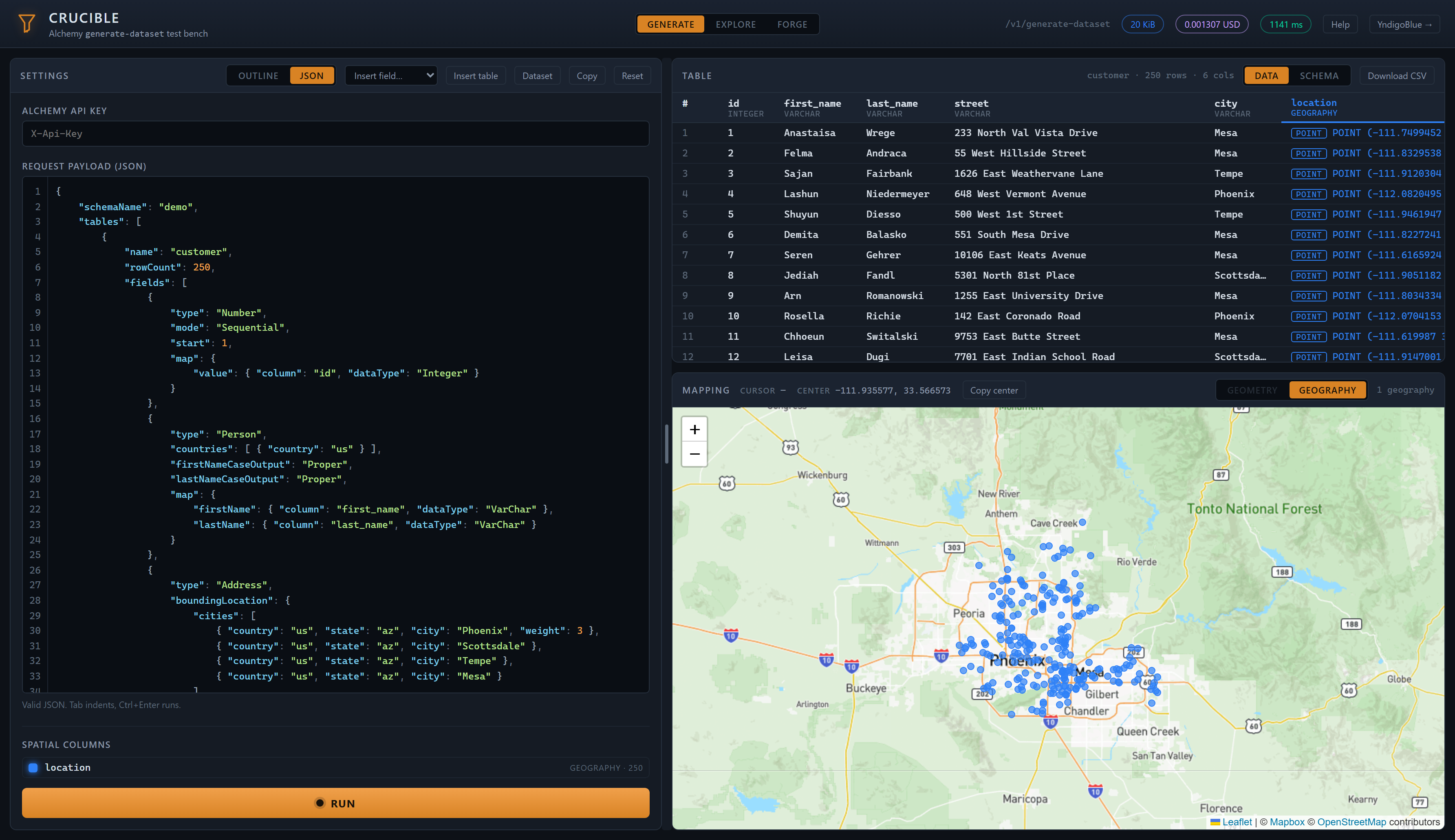
Crucible displays the generated rows, the data type of each column, the schema returned with the data, and a map of any spatial column. The result can be downloaded as CSV.
Requests made in Crucible use your API key and are billed the same as any other request. The response is the same as for a request sent from your own client.
Using Postman
The API serves an OpenAPI document at GET /openapi/v1.json that Postman can import as a
collection:
- In Postman, go to File > Import and enter
https://api.alchemy.example/openapi/v1.json, using the base URL you call the API on. Postman creates a collection with one request per endpoint, each with a request body that matches its schema. - To import from a file instead, open the API Reference page, use its
Download OpenAPI Document link to save
openapi.json, and select that file in File > Import. - To use your API key in every request: create a Postman environment variable (e.g.
apiKey) containing the key from Getting Started, then set the collection'sX-Api-Keyheader to{{apiKey}}. - Replace the example body with your request, then send it. The example body has the correct structure but placeholder values.